So, you’re ready to lay down some tracks and unleash your inner musician? That's awesome! But with so many options out there, finding the best program to record music can feel overwhelming. Don't sweat it. This guide will walk you through the top choices, whether you're a complete beginner or a seasoned pro, helping you pick the perfect digital audio workstation (DAW) for your unique needs and budget.
At a glance:
- Beginner-Friendly: GarageBand (Apple), Waveform Free
- Electronic Music Production: FL Studio, Ableton Live, LMMS (Free)
- Industry Standard: Pro Tools
- Budget-Conscious: Reaper, Waveform Free, GarageBand (Apple)
- Cross-Platform: Ableton Live, FL Studio, Waveform Free, Reaper
What Exactly Is a DAW, Anyway?
Think of a DAW (Digital Audio Workstation) as your all-in-one recording studio inside your computer. It's the software that lets you record instruments and vocals, edit those recordings, add effects, arrange your song, and mix it all together into a final track. It’s the central hub for virtually all modern music production. Some DAWs are simple and intuitive, perfect for getting started quickly, while others offer a huge array of advanced features that can take years to master.
Free DAWs: Powerful Tools That Won't Break the Bank
Just starting out, or on a tight budget? You don't need to spend a fortune to get a capable DAW. Here are some of the best free options available:
- GarageBand (macOS/iOS): If you're an Apple user, GarageBand is likely already on your device. It's incredibly user-friendly, making it a fantastic starting point. Plus, it's a great stepping stone towards Apple's more powerful (and paid) Logic Pro X.
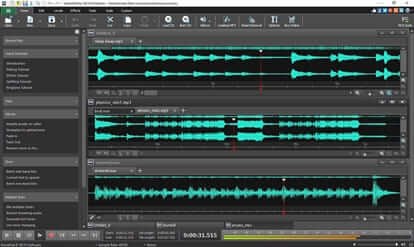
- Waveform Free: Don't let the "free" label fool you – Waveform Free is a surprisingly comprehensive DAW. Unlike some free options, it doesn't impose limitations on the number of tracks, storage, or export options, making it suitable for recording bands, producing electronic music, or even podcasting.
- LMMS (Windows/macOS/Linux): A favorite among electronic music producers, LMMS (Linux Multimedia Studio) is a free, open-source DAW packed with features. It boasts a powerful MIDI sequencer, built-in synthesizers, and sample-based instruments, perfect for creating electronic beats and melodies.
- Audacity (Windows/macOS/Linux): While primarily an audio editor, Audacity functions perfectly well as a multitrack recorder. It's an excellent choice for podcasters, voice-over artists, and musicians who need a reliable and quick way to clean up or edit audio.
- Fender Studio (Cross-Platform): Designed with guitarists and bassists in mind, Fender Studio is a free, cross-platform application that lets you capture ideas, jam with professional multi-track sessions, and shape your tone using models of genuine Fender amps and effects. It's a great way to quickly record guitar riffs or basslines.
Paid DAWs: Level Up Your Production Game
Once you're ready to invest in more advanced features and capabilities, these paid DAWs are well worth considering:
- Ableton Live 11 (Windows/macOS): Known for its unique "Session View," Ableton Live excels at live performance and improvisation. Its workflow is incredibly flexible, making it a popular choice for electronic music producers and performers. You can get started using Ableton Live for around $99.
- FL Studio 21 (Windows/macOS): A staple in the EDM and hip-hop worlds, FL Studio is renowned for its intuitive step sequencer and lifetime free updates. Many producers appreciate the ability to get the latest updates without a subscription fee. Pricing starts at $99.
- Logic Pro X (macOS): Apple's flagship DAW, Logic Pro X, offers a comprehensive suite of tools for audio recording, MIDI composition, and mixing. It comes with a vast library of instruments, effects, and loops. Logic Pro X is available for a one-time purchase of $199.99.
- Pro Tools (Windows/macOS): The industry standard for music, film, and post-production audio, Pro Tools provides an end-to-end environment for recording, editing, and mixing. It's a powerful tool, but can have a steeper learning curve. Subscriptions start at $9.99 per month. As digital audio workstations become more affordable, many studios are still using Pro Tools for its collaborative functions.
- PreSonus Studio One (Windows/macOS): Studio One's drag-and-drop workflow and chord-based composition tools make it incredibly intuitive for songwriters and producers. It's a modern DAW with a focus on speed and creativity. Subscriptions start at $14.95 per month.
- Reaper (Windows/macOS/Linux): Don't be fooled by its simple interface – Reaper is an incredibly powerful DAW that offers exceptional value for the price. A single-user license is only $60, and commercial licenses are available for $225.
- Adobe Audition (Windows/macOS): Part of the Adobe Creative Cloud suite, Audition is ideal for professional audio restoration and post-production work, particularly if you are already comfortable with the Adobe ecosystem and monthly subscription model which currently runs at $22.99. A free trial is also available.
Key Features to Consider When Choosing a DAW
No matter which DAW you choose, keep these essential features in mind:
- Audio Quality: Always record in uncompressed formats (like WAV) with a bit depth of at least 16-bit and a sample rate of 48kHz to ensure studio-quality recordings.
- Editing Tools: Look for features like noise reduction, EQ, and auto-tune capabilities to polish your audio.
- Multi-track Recording: This is crucial for recording multiple instruments or vocals simultaneously.
- Plugin Integration: Make sure the DAW supports VST or AU plugins, which allow you to add virtual instruments and effects.
- Text-Based Editing: An emerging trend, text-based editing, or tools supported by AI, can dramatically speed up the editing process.
Navigating the DAW Marketplace: Noteworthy Trends
The digital audio workstation market is booming, projected to reach $3.1 billion in 2024 with a compound annual growth rate of 9.2% since 2018. North America currently holds the largest share of the market. This growth indicates a healthy and evolving landscape with constant innovation and new features being introduced. The increasing accessibility of DAWs has also made music production more democratic, empowering more musicians to create and share their work.
Beyond the DAW: Additional Audio Software to Explore
While your DAW is the heart of your studio, there are other software tools that can enhance your workflow.
- Riverside: If you need to record remote audio with studio quality, Riverside is an excellent option.
- Voice Record Pro: A great choice for capturing high-quality audio on the go using your mobile device (iOS and Android).
- Sound Forge Audio Studio: Perfect for voice-overs and detailed audio editing.
- Bitwig Studio: A powerful all-in-one software for music production.
- Magix Acid Pro: Another all-in-one solution for music production.
- iZotope Music Production Suite: Offers a range of modern and innovative tools for music production.
- MOTU Digital Performer 11: Provides advanced music production tools for professionals.
- OBSBOT Tail 2: A camera specifically designed for musicians, streamers, and educators.
Frequently Asked Questions (FAQ)
Q: What's the easiest DAW to learn for beginners?
A: GarageBand (for Mac users) and Waveform Free are often recommended for their intuitive interfaces and beginner-friendly features.
Q: Do I need expensive equipment to start recording music?
A: Not necessarily! A decent computer, audio interface, microphone (or instrument cable), and headphones are a good starting point.
Q: What’s the difference between VST and AU plugins?
A: VST (Virtual Studio Technology) is a plugin format developed by Steinberg, while AU (Audio Units) is Apple's native plugin format for macOS. Most DAWs support both.
Q: Can I use a DAW to record live instruments?
A: Absolutely! DAWs are designed to record any audio source, including live instruments and vocals.
Make an Informed Choice and Start Creating!
Choosing the best program to record music depends heavily on your individual needs, budget, and skill level. Start by exploring the free options to get a feel for what DAWs can do. As you progress and your needs evolve, you can then consider upgrading to a paid DAW that offers more advanced features and capabilities. Don't be afraid to experiment and find the software that best suits your workflow and inspires your creativity. The most important thing is to start making music!