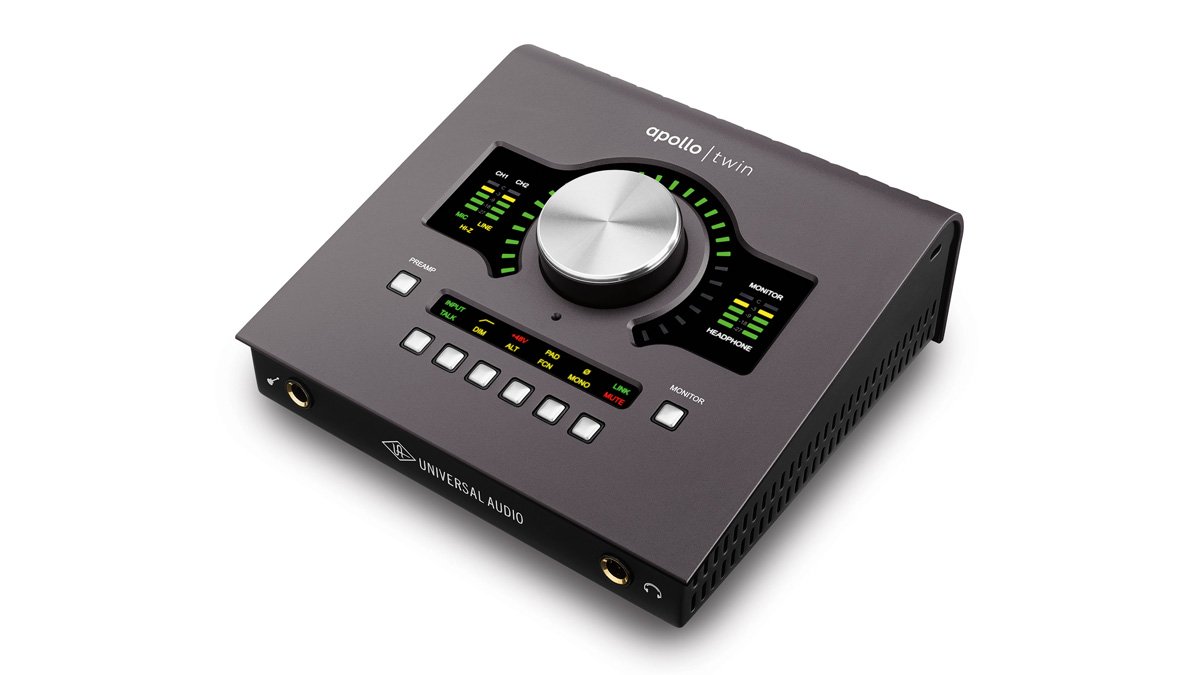
Ever tried plugging a microphone directly into your computer and wondered why it sounds... well, less than stellar? That's where an audio interface comes in. It's the crucial link that transforms your computer into a powerful recording studio.
At a glance:
- An audio interface converts analog audio signals (like vocals or instruments) into digital signals your computer can understand, and vice versa for playback.
- Key factors to consider when choosing an interface include connectivity, preamp quality, latency, and bundled software.
- There are audio interfaces for every budget, from affordable entry-level models to professional-grade options.
- Understanding your specific recording needs is crucial for selecting the right interface.
What Exactly Is an Audio Interface?
Think of your computer's built-in sound card as a basic translator. It can handle simple audio tasks, but it lacks the power and precision needed for professional-quality recording. The audio interface steps in as a specialized translator, offering superior sound quality and more control over your recordings. It’s essential for any serious musician, podcaster, or audio engineer. You'll find that the right interface can drastically improve the clarity and nuance of your sound.
Fundamentally, the audio interface performs two crucial tasks:
- Analog-to-Digital Conversion (ADC): It takes the analog signals from your microphones, instruments, and other audio sources, and converts them into digital data that your computer can record and manipulate.
- Digital-to-Analog Conversion (DAC): It takes the digital audio from your computer and converts it back into analog signals that you can hear through your speakers or headphones.
Why You Need an Audio Interface (It's More Than Just Sound Quality)
Beyond just improving sound quality, an audio interface offers a range of benefits Top Audio Interfaces for Home Studios that will streamline your recording process:
- Better Sound Quality: Higher-quality preamps and converters translate to cleaner, more detailed recordings.
- Lower Latency: Reduced delay between playing an instrument and hearing it back through your headphones enables better performance.
- Versatility: Multiple inputs and outputs let you record multiple instruments or microphones simultaneously, and connect to different types of studio equipment.
- Phantom Power: Provides the necessary power for condenser microphones, which are often preferred for vocals and acoustic instruments.
- Direct Monitoring: Allows you to hear your performance in real-time, without the delay of going through your computer.
- Improved Connectivity: Offers professional connections like XLR and 1/4" inputs, and balanced outputs for connecting to studio monitors.
Key Factors to Consider When Choosing Your Audio Interface
Selecting the right audio interface can feel overwhelming, but breaking it down into a few key considerations makes the process much easier.
1. Connectivity: Inputs and Outputs
Consider what you need to record. Are you primarily recording vocals? A single-input interface might suffice. Do you need to record a drum kit or a band simultaneously? Then you'll need an interface with multiple inputs. Top 8 Channel Interfaces offer this kind of simultaneous recording.
- XLR Inputs: For microphones.
- Line Inputs: For instruments like keyboards and synthesizers, or pre-amplified signals.
- Instrument Inputs (Hi-Z): Specifically designed for guitars and basses, optimizing the impedance for a better signal.
- Headphone Outputs: Essential for monitoring your recordings. Some interfaces offer multiple headphone outputs for multiple performers.
- Outputs: For connecting to studio monitors or other audio equipment.
- Digital I/O (S/PDIF, ADAT): Allows you to expand your input/output capabilities by connecting to other digital devices.
Also, consider the type of connection to your computer: - USB: The most common and versatile option.
- Thunderbolt: Offers faster speeds and lower latency, ideal for demanding recording sessions. Thunderbolt tends to be more prevalent among Mac Audio Interface Guide.
2. Preamps: Amplifying Your Sound
Preamps are responsible for boosting the weak signal from your microphone or instrument to a usable level for recording. The quality of the preamp significantly impacts the overall sound of your recordings.
- Gain Range: Ensure the preamp has enough gain to amplify quiet sources without introducing excessive noise.
- Clean vs. Colored Preamps: Some preamps are designed to be transparent, while others add a specific character or warmth to the sound. This is where personal preference comes into play, and reviews can provide insight on this.
3. Latency: The Delay You Don't Want
Latency is the delay between when you play an instrument or sing into a microphone, and when you hear it back through your headphones. High latency can make it difficult to record in time and can be incredibly frustrating.
- Buffer Size: Lower buffer sizes result in lower latency, but require more processing power from your computer. Experiment to find the optimal balance.
- Direct Monitoring: A feature that allows you to hear your input signal directly, bypassing the computer's processing and eliminating latency. This is often a lifesaver. Many Learn about XLR interfaces now include direct monitoring.
4. Software: Bundled Value
Many audio interfaces come bundled with software, such as:
- Digital Audio Workstations (DAWs): Software for recording, editing, and mixing audio (e.g., Ableton Live Lite, Pro Tools First, Cubase AI).
- Plugins: Virtual instruments and effects (e.g., compressors, equalizers, reverbs).
Consider the value of the bundled software when making your decision, especially if you don't already own a DAW or plugins.
5. Budget: Finding the Sweet Spot
Audio interfaces range in price from under $50 to several thousand dollars. Set a budget and prioritize the features that are most important to you. Remember that investing in a slightly more expensive interface with better preamps or lower latency can pay off in the long run with improved recording quality and a more enjoyable recording experience. Amazon offers a vast selection of options, so you're sure to find something that fits your needs Explore USB Sound Card Options.
6. Special Features: Going the Extra Mile
Some audio interfaces offer additional features that can be useful depending on your specific needs:
- Phantom Power: Essential for condenser microphones.
- Direct Monitoring: As discussed earlier, eliminates latency when monitoring your recordings.
- Impedance Switching: Allows you to optimize the input impedance for different instruments, resulting in a better signal.
- DSP Processing: Some interfaces have built-in digital signal processing (DSP) that allows you to apply effects like EQ and compression without taxing your computer's CPU.
- Preamp Modeling: Some interfaces offer different preamp modes that emulate the sound of classic hardware preamps.
Popular Audio Interface Models: A Quick Look
Here's a brief overview of some popular audio interfaces, categorized by use case and budget:
- For Beginners:
- M-Audio M-Track Solo/Duo: Simple, affordable, and easy to use.
- PreSonus AudioBox GO/96: Compact and versatile, with bundled Studio One Artist software.
- Focusrite Scarlett Solo: A classic choice.
- For Intermediate Users:
- Focusrite Scarlett 2i2: A step up from the Solo, with two inputs and improved preamps.
- MOTU M2/M4: Known for their excellent sound quality and low latency.
- Solid State Logic SSL 2/2+: Offers a "4K" mode that adds a vintage-inspired high-end boost.
- For Advanced Users:
- Universal Audio Apollo Twin X: A professional-grade interface with powerful DSP processing and Unison preamps.
- MOTU 848: A rackmount interface with a large number of inputs and outputs.
- For Guitarists:
- IK Multimedia AXE I/O: Designed specifically for guitarists, with a JFET input and impedance control.
- Portable Recording:
- IK Multimedia iRig: An affordable and ultraChoose one of these options: Portable option for recording on the go.
- Universal Audio Volt 1/2: Compact and stylish, with a vintage mic preamp mode.
- For Podcasting:
- Rode Rodecaster Duo: An all-in-one podcasting solution with built-in effects and sound pads.
- Shure MVX2U: A single-channel USB interface that can turn any XLR microphone into a USB microphone.
Remember to research and read reviews before making a purchase to ensure the interface meets your specific needs and budget.
Understanding Latency Numbers
Latency is measured in milliseconds (ms). Here's a general guideline:
- Below 5ms: Unnoticeable latency, ideal for real-time performance.
- 5-10ms: Acceptable latency for most recording situations.
- 10-20ms: Noticeable latency, may be distracting for some performers.
- Above 20ms: Significant latency, difficult to record with.
The actual latency you experience will depend on a number of factors, including your computer's processing power, the audio interface's drivers, and the buffer size you set in your DAW. As musicradar.com points out, low latency is paramount.
Audio Interface vs. Sound Card: What's the Difference?
While the terms are sometimes used interchangeably, there's a key distinction: a sound card is a general-purpose audio device built into most computers, while an audio interface is an external device specifically designed for professional audio recording and playback. Think of it this way: your built-in sound card is like a Swiss Army knife, while an audio interface is like a set of specialized tools. If you want the best Top Mac Audio Interfaces, go for a purpose-built device.
Common Questions and Misconceptions
- Do I need an audio interface if I only record vocals? Yes, an audio interface will significantly improve the sound quality of your vocal recordings compared to using your computer's built-in microphone input.
- Can I use an audio interface with my laptop? Absolutely! Most audio interfaces connect to computers via USB or Thunderbolt, making them compatible with both desktop and laptop computers.
- Is a more expensive audio interface always better? Not necessarily. While higher-priced interfaces often offer better preamps, lower latency, and more features, the best interface for you depends on your specific needs and budget. recommended audio interface is often in the eye (and ear) of the beholder.
- What is phantom power, and do I need it? Phantom power is a DC voltage (usually 48V) that's required to power condenser microphones. If you plan to use a condenser microphone, you'll need an audio interface with phantom power.
- Can I use an audio interface for live performances? Yes, many musicians use audio interfaces for live performances. They can be used to process audio signals, connect to PA systems, and even run virtual instruments.
Level Up Your Workflow
Choosing an audio interface isn't just about better sound; it's about optimizing your workflow. For instance, if you're primarily focused on recording vocals, you might want to research Find the perfect vocal interface. Maybe you're using your interface to Connect Mic to Computer for streaming. Think about how you're using your equipment, and select accordingly.
Taking the Next Step
Choosing the right audio interface is a crucial step in creating a professional-sounding recording setup. By carefully considering your needs, budget, and the key factors outlined in this guide, you can confidently select an interface that will empower you to capture your best performances. Don't be afraid to read reviews, compare models, and experiment to find the perfect fit for your unique workflow. Now that you have a handle on things, why not top audio interfaces and find yours?